Every Windows .exe and .dll is stored in a format called PE, short for
Portable Executable.
At first, a PE file can look like a maze of headers, tables, and strange section names. The useful way to think about it is simpler: a PE file is a set of instructions for the Windows loader. It tells Windows what code to map into memory, what DLL functions the program needs, which addresses may need fixing, and where execution should begin.
This post walks through the parts that matter most when you are learning Windows internals or starting to understand shellcode.
PE-bear
PE-bear is a Windows tool for opening executable files and seeing their structure. It shows the headers, sections, imports, exports, disassembly, and raw bytes in one place.
The screenshots here were captured from PE-bear 0.7.1 using a small Rust test executable. The language is not important for this post; the goal is to look at the Windows file format.
The loader’s map
When you double-click an executable, Windows does not just copy the whole file into memory and start running from the first byte.
Instead, Windows reads the PE headers. The headers tell it:
- what CPU architecture the file targets,
- how many sections the file has,
- where the program wants to be loaded in memory,
- where the first instruction is,
- which DLL functions must be resolved before the program starts,
- and whether any addresses need to be adjusted for ASLR.
The old MZ header at the beginning of the file points Windows to the real
PE headers. From there, the loader has enough information to turn the file
on disk into a running program.
Sections
A PE file is split into sections. Each section is a named region with a purpose.
Here is a normal release build opened in PE-bear:
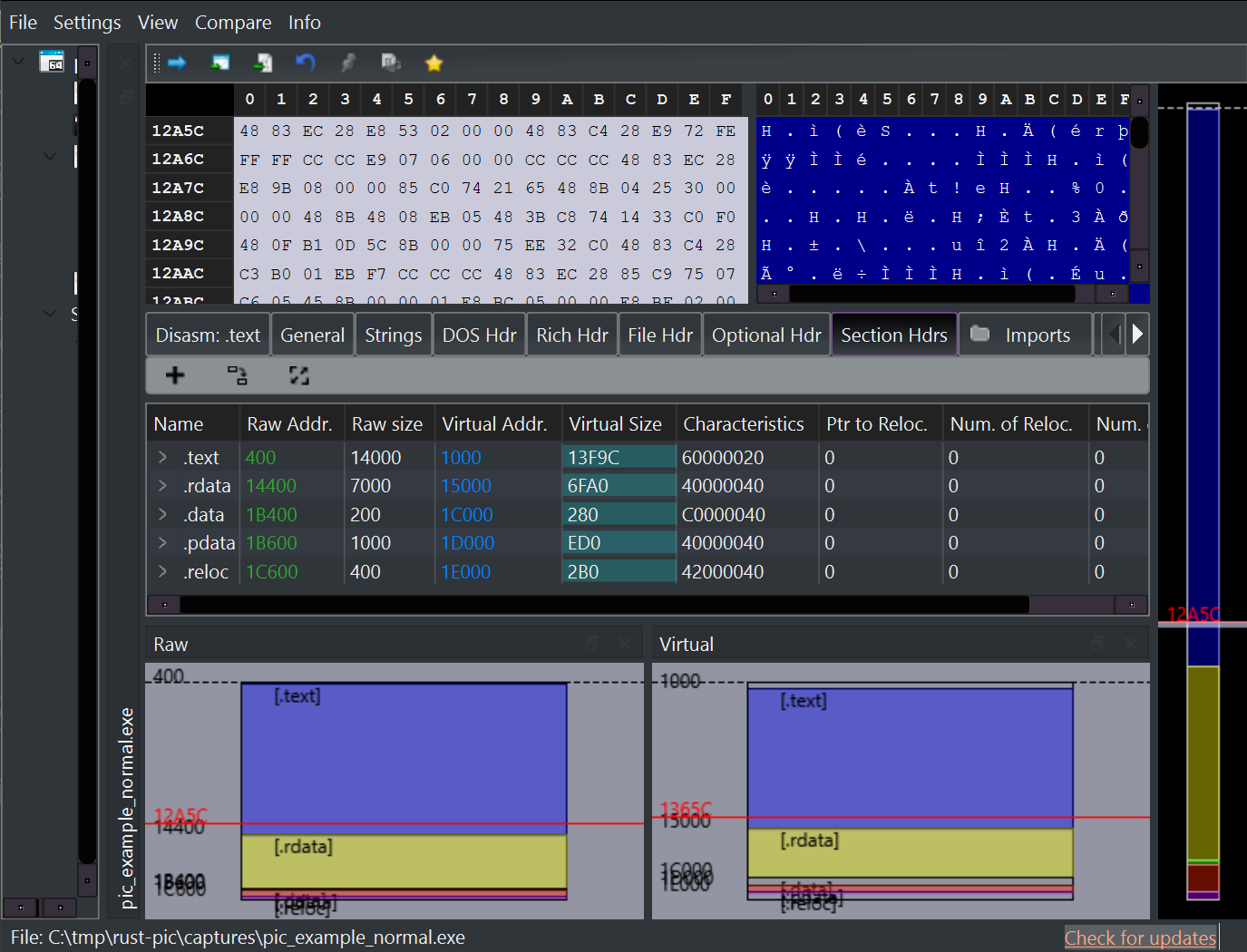
The important sections in this example are:
| Section | Simple meaning |
|---|---|
.text |
The machine code that runs |
.rdata |
Read-only data, such as strings and tables |
.data |
Writable global data |
.pdata |
Exception and unwind information used on 64-bit Windows |
.reloc |
A table of addresses Windows may need to fix at load time |
Sections also have permissions. Code is usually read and execute. Writable data is read and write. The loader uses these permissions when it maps the file into memory.
Imports
Most programs call functions that live in Windows DLLs. For example,
VirtualAlloc lives in kernel32.dll; many lower-level functions live in
ntdll.dll.
The executable does not contain those functions. It contains an import table that says, in effect, “before I start, please find these DLLs and these functions for me.”
PE-bear shows that table clearly:
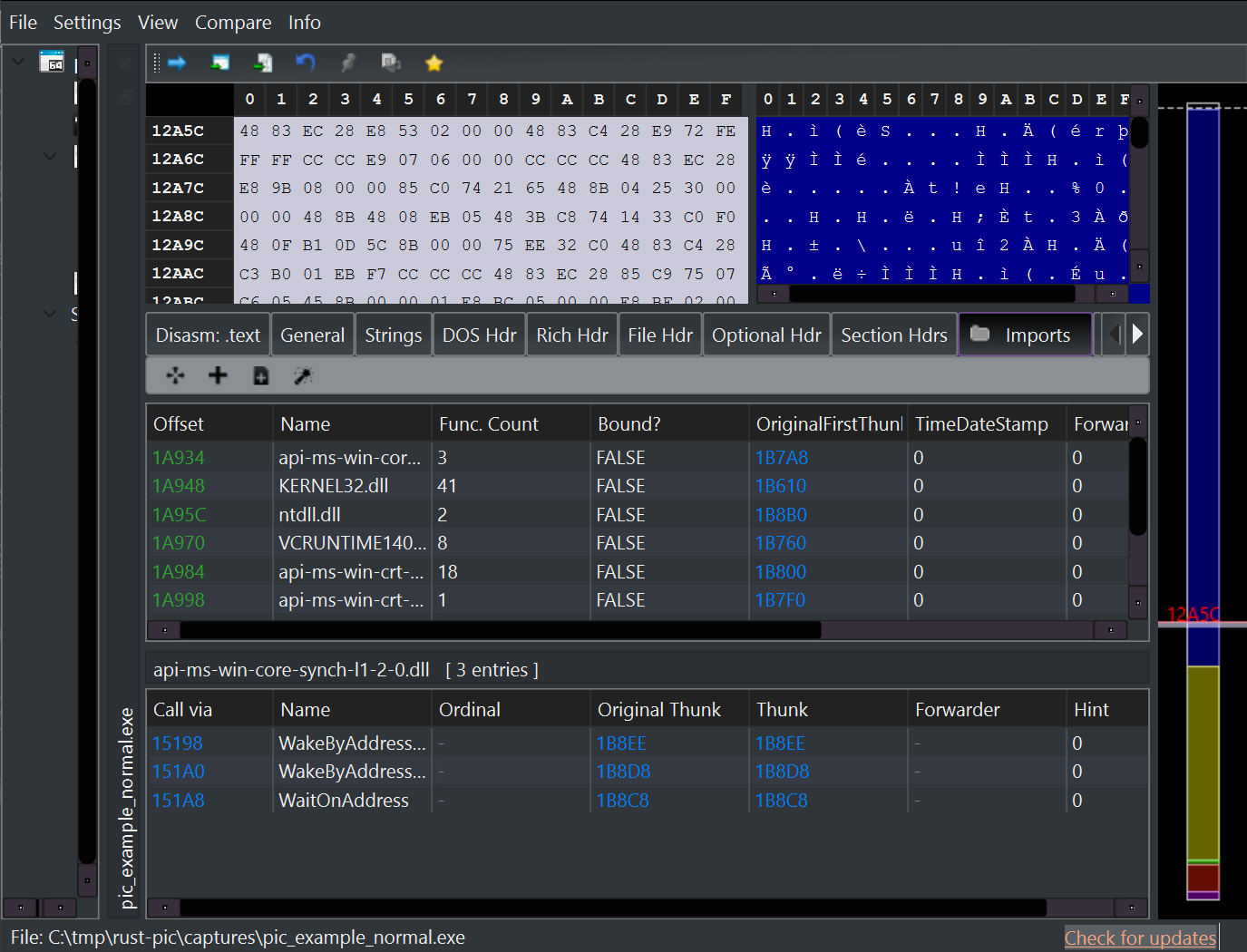
Before the program reaches its entry point, the Windows loader reads this table, finds the real function addresses, and writes them into the program’s Import Address Table.
After that, the program can call those functions through the filled-in addresses. This is normal Windows executable behavior.
Relocations
Executables are built as if they will load at a preferred address. On
64-bit Windows, a common preferred base for an .exe is 0x140000000.
Because of ASLR, Windows may load the program somewhere else. If the program contains absolute addresses, those addresses would now be wrong.
The .reloc section exists to fix that. It tells the loader which values
inside the image should be adjusted when the actual load address is
different from the preferred one.
That is all a relocation is: a note to the loader saying “this address may need to move with the image.”
The PEB
Once a process is running, Windows keeps process information in a structure called the Process Environment Block, or PEB.
On 64-bit Windows, code can read the PEB address from gs:[0x60]. The PEB
contains, among other things, a pointer to loader data. That loader data
tracks which DLLs are already loaded in the process.
Why does this matter? Because code can walk the PEB’s module list, find a
DLL such as ntdll.dll, and then parse that DLL’s export table to find a
function address. That is one way code can resolve functions without using
the import table of its own executable.
You do not need to memorize the offsets yet. The important idea is:
- imports ask the Windows loader to resolve functions before startup;
- PEB walking finds already-loaded modules at runtime.
Why shellcode is different
Shellcode is usually copied into memory as raw bytes and called directly. There may be no PE headers beside it. There may be no import table for the Windows loader to fill. There may be no relocation table for Windows to apply.
That means shellcode has to be more self-contained than a normal .exe.
It must know how to find what it needs after it starts running.
Here is a small position-independent build opened in PE-bear:

This file is much smaller than the normal build. It has one .text section,
no import directory, and no base relocation directory. PE-bear does not show
an Imports tab for it because there are no imports to display. The visible
structured tab beside the section view is exception metadata:

This does not mean every executable should look like this. Normal programs should use the loader. The point is only that raw payloads have fewer loader services available, so they need a different design.
The main idea
A normal Windows executable relies on the PE loader for a lot of setup:
- mapping sections into memory,
- applying permissions,
- resolving imports,
- applying relocations,
- and jumping to the entry point.
Shellcode usually cannot rely on that setup. That is why PE sections, imports, relocations, and the PEB are worth understanding early.